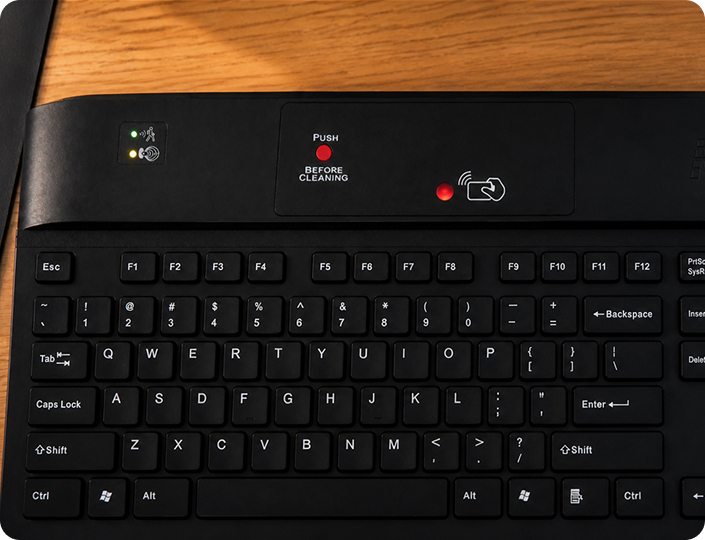
KSI designs secure desktop solutions that protect access at the point of use
Who We Are
KSI designs secure desktop solutions that protect access at the point of use — at the desktop, where users interact directly with critical systems. From healthcare to enterprise environments, KSI helps organizations strengthen security, streamline workflows, and reduce risk at shared workstations.
By combining authentication technologies with practical, user-focused design, KSI brings together security, hygiene, and usability in a single solution. This integrated approach helps organizations protect sensitive data while maintaining efficiency in fast-paced, high-demand environments.
Four Decades Of Desktop Innovation
With more than four decades of experience, KSI has evolved alongside the desktop – from early computing systems to today’s security-driven environments.
From manufacturing key components for early computing platforms to developing modern authentication and desktop hygiene technologies, KSI has consistently focused on solving real-world challenges.
1979
Company founding
1980s
Manufacture of Apple II keycaps and first KSI keyboard
1990s
Security keyboard manufacture for US retail giants
2000s
Protecting healthcare with hygienic input devices
2010s
Pioneering integrated MFA at the desktop
Today
Full-circle security with FIDO-ready workflows and KSI PresenceLock™
Built For Real-World Environments
KSI solutions are deployed across industries where security, compliance, and efficiency matter most: healthcare, banking & finance, corporate enterprise, higher education, manufacturing, and government.
From fast-paced hospital workstations to high-security financial systems, KSI technology is designed to perform reliably in environments where every second and every login matters. These workplaces demand more than basic authentication.
KSI solutions are designed to bring multiple layers of security and usability together at the desktop
Detects user presence and automatically logs off unattended workstations
Crevice-free, disinfectable keyboards for shared workstations
Multiple security components delivered through a single USB
Integrated Authentication
Integrated Authentication
Combine RFID/NFC, biometrics, security keys, and authentication technologies directly at the desktop for streamlined access workflows.
Presence Detection
Presence Detection
PresenceLock™ helps protect active sessions by detecting user absence and automatically securing unattended workstations.
Hygienic Design
Hygienic Design
Crevice free, disinfectable keyboards designed to support infection control and easier cleaning in shared environments.
Simplified Deployment
Simplified Deployment
Multiple integrated technologies delivered through a single USB connection to reduce desktop clutter and simplify implementation.
Our Commitment
KSI is committed to delivering solutions that are secure, practical, reliable, and easy to deploy and use – because effective security at the desktop should enhance workflows, not disrupt them.